> ## Documentation Index
> Fetch the complete documentation index at: https://help.mercury360.com/llms.txt
> Use this file to discover all available pages before exploring further.
# Configuration
> Set up and control organization-wide settings, hiring workflows, templates, and integrations.
Use **Configuration** to manage system-level setup for your organization—company structure, hiring workflows, templates, compliance settings, and integrations.
Changes made in Configuration affect the entire organization. Use caution when updating workflows, templates, or privacy settings.
## What Configuration is for
Use this section when you need to:
* Set up company details and structure
* Define hiring stages and workflows
* Manage templates and candidate communication
* Configure integrations and data settings
## Access Configuration
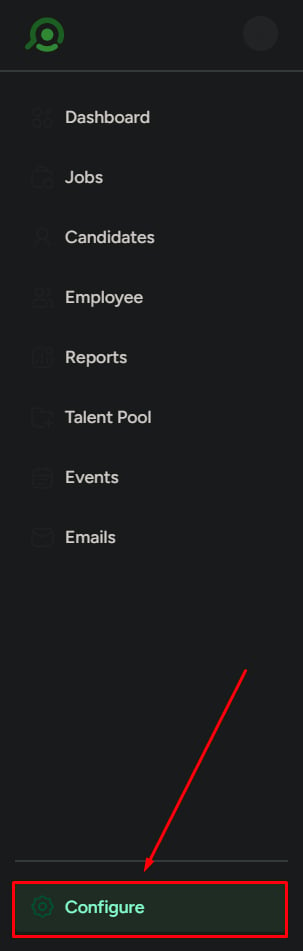
In the sidebar, click **Configuration**.
You’ll land on **Profile** by default.
 ## Configuration sections
Configuration is divided into the following areas:
### Company Settings
Manage basic company information and structure.
* **Profile**: company details
* **Department**: team structure
### Security & Compliance
Control data handling and compliance settings.
* **Data Privacy & Compliance**
### Career Site & Distribution
Manage how jobs are displayed and shared externally.
* **Career Site**
* **Job Publishing & Distribution**
### Integrations
Connect external tools and services.
* **Integrations**
### HR & Employee Setup
Define employee data and onboarding structure.
* **Profile Template**
* **Onboarding Template**
### Recruitment Configuration
Control how hiring works inside the system.
* **Pipeline Process**
* **Communication Template**
* **Questionnaire Template**
## What to be careful about
Changes here affect the entire system.
* Incorrect setup can break hiring workflows
* Template updates affect future communication
* Pipeline changes impact how candidates are tracked and reported
Don’t make changes unless you understand the impact. If you’re unsure, review the current setup before saving updates.
## What this is not for
Do not use Configuration for:
* Managing candidates
* Scheduling interviews
* Sending emails
* Daily hiring tasks
Configuration is for system setup and organization-wide control—not day-to-day recruiting operations.
## Configuration sections
Configuration is divided into the following areas:
### Company Settings
Manage basic company information and structure.
* **Profile**: company details
* **Department**: team structure
### Security & Compliance
Control data handling and compliance settings.
* **Data Privacy & Compliance**
### Career Site & Distribution
Manage how jobs are displayed and shared externally.
* **Career Site**
* **Job Publishing & Distribution**
### Integrations
Connect external tools and services.
* **Integrations**
### HR & Employee Setup
Define employee data and onboarding structure.
* **Profile Template**
* **Onboarding Template**
### Recruitment Configuration
Control how hiring works inside the system.
* **Pipeline Process**
* **Communication Template**
* **Questionnaire Template**
## What to be careful about
Changes here affect the entire system.
* Incorrect setup can break hiring workflows
* Template updates affect future communication
* Pipeline changes impact how candidates are tracked and reported
Don’t make changes unless you understand the impact. If you’re unsure, review the current setup before saving updates.
## What this is not for
Do not use Configuration for:
* Managing candidates
* Scheduling interviews
* Sending emails
* Daily hiring tasks
Configuration is for system setup and organization-wide control—not day-to-day recruiting operations.