> ## Documentation Index
> Fetch the complete documentation index at: https://help.mercury360.com/llms.txt
> Use this file to discover all available pages before exploring further.
# Integrations Hub | Connect and Manage External Tools
> Connect and manage external tools used across your organization and recruitment workflows from a single hub.
Connect and manage external tools used by your organization and recruitment workflows.
Integrations can affect multiple users and automated workflows. Always review the permissions request before connecting and be cautious when disconnecting active integrations.
## This section helps you
* Connect third-party tools like Google and email services
* Manage organization-wide integrations
* Control recruitment-specific integrations
* Disconnect integrations when no longer needed
## When to use this
Use this when you need to:
* Connect email or communication tools
* Enable integrations for hiring workflows
* Manage organization-level connected apps
* Remove or disconnect unused integrations
## Open the Integrations Hub
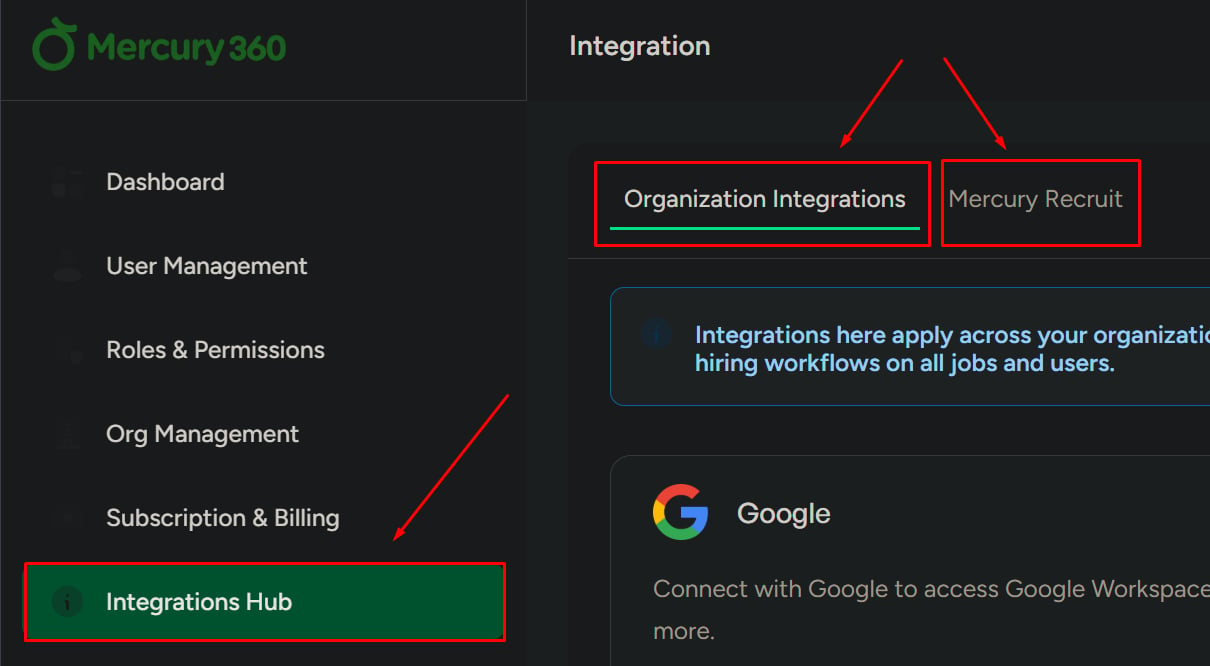
Click **Integrations Hub** from the left navigation panel.
You will see two tabs for different integration categories.
 ## Integration types
These integrations apply to the entire organization.
**Used for:**
* Shared tools across teams
* Organization-wide communication or automation
These integrations are used only within the **Recruit** product.
**Used for:**
* Hiring workflows
* Candidate communication
* Recruitment automation
## Connect an integration
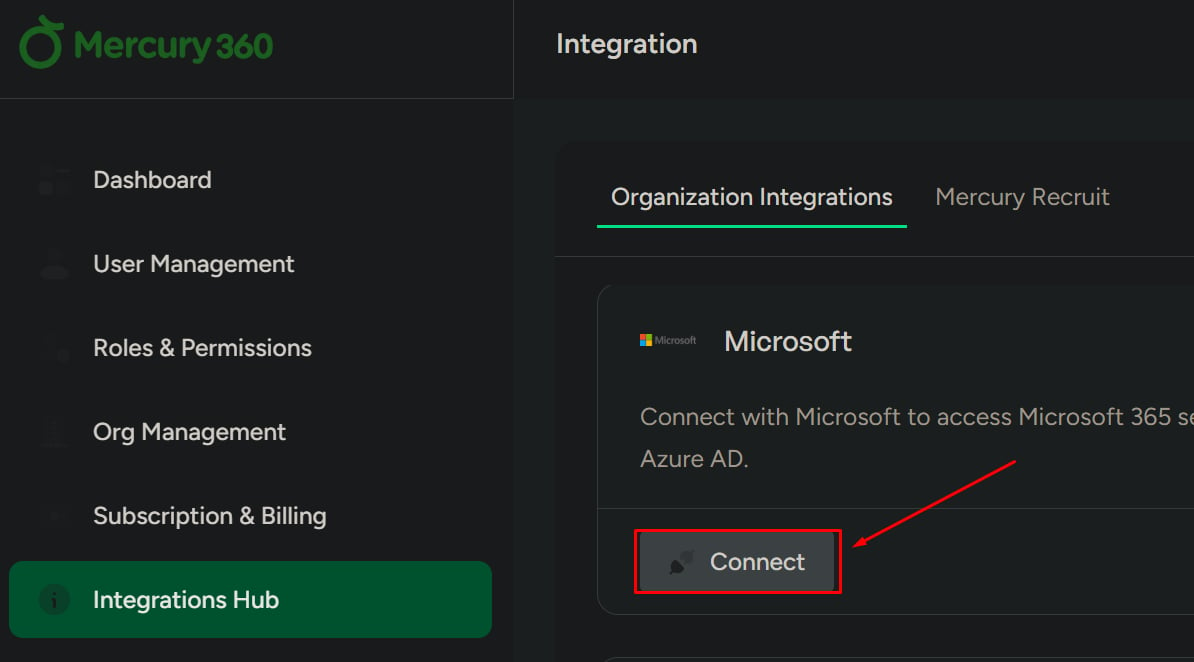
Each integration includes a **Connect** button.
Find the integration you want and click **Connect**.
A popup will appear showing:
* What will happen after connection
* What access you are granting
* What control you will have over the integration
Check the consent checkbox to continue. You cannot proceed without accepting this.
Click **Agree & Continue**. You will be redirected to the relevant provider login.
Select your account and confirm access permissions. After confirmation, the integration connects successfully.
## Integration types
These integrations apply to the entire organization.
**Used for:**
* Shared tools across teams
* Organization-wide communication or automation
These integrations are used only within the **Recruit** product.
**Used for:**
* Hiring workflows
* Candidate communication
* Recruitment automation
## Connect an integration
Each integration includes a **Connect** button.
Find the integration you want and click **Connect**.
A popup will appear showing:
* What will happen after connection
* What access you are granting
* What control you will have over the integration
Check the consent checkbox to continue. You cannot proceed without accepting this.
Click **Agree & Continue**. You will be redirected to the relevant provider login.
Select your account and confirm access permissions. After confirmation, the integration connects successfully.
 ## Disconnect an integration
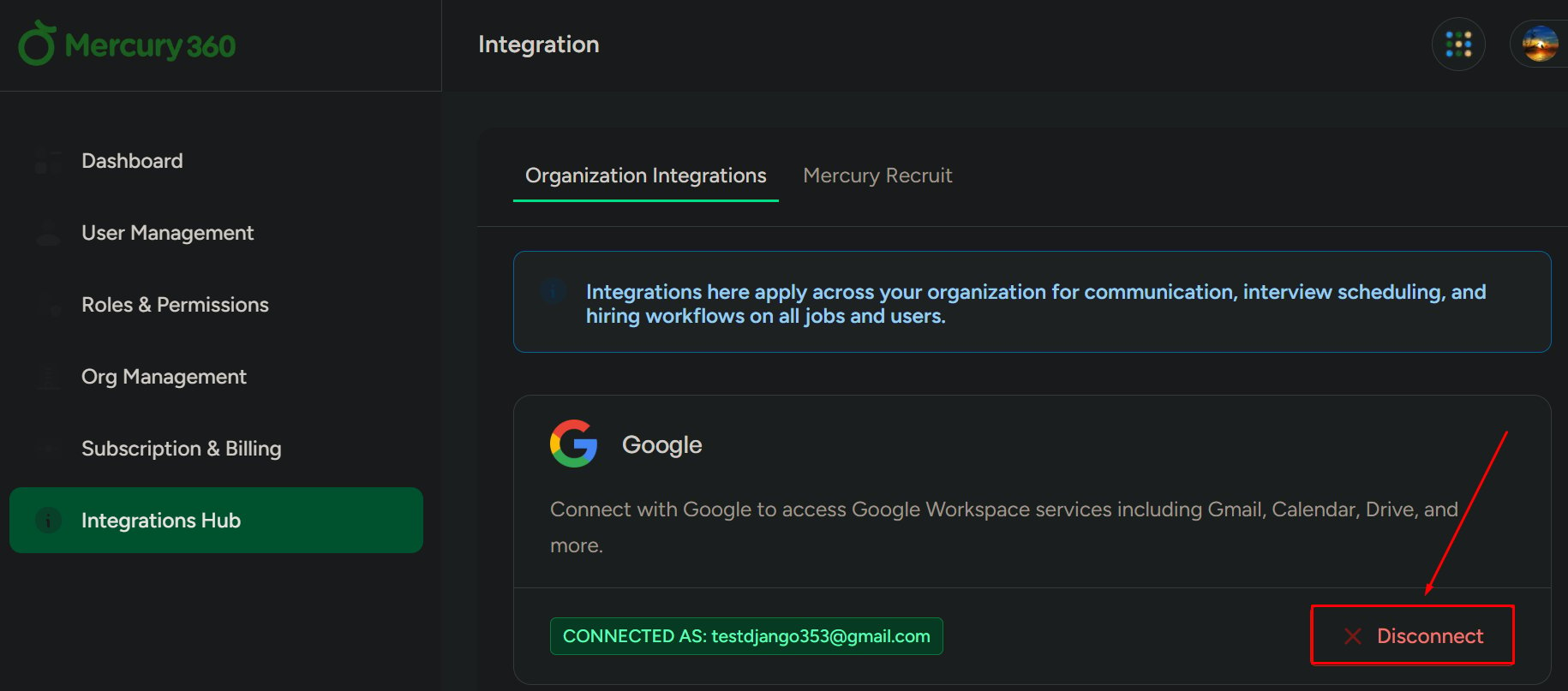
Use this to remove an active integration.
Click **Disconnect** on the integration you want to remove.
A confirmation popup appears with options:
* **Yes, Disconnect**
* **Cancel**
If confirmed, the integration is removed immediately.
## Disconnect an integration
Use this to remove an active integration.
Click **Disconnect** on the integration you want to remove.
A confirmation popup appears with options:
* **Yes, Disconnect**
* **Cancel**
If confirmed, the integration is removed immediately.
 ## What to be careful about
* Disconnecting integrations may stop automated workflows
* Removing organization integrations can affect multiple users
* Always review permissions before connecting external tools
* Make sure you understand email consent requirements before enabling email-related integrations
## What to be careful about
* Disconnecting integrations may stop automated workflows
* Removing organization integrations can affect multiple users
* Always review permissions before connecting external tools
* Make sure you understand email consent requirements before enabling email-related integrations