> ## Documentation Index
> Fetch the complete documentation index at: https://help.mercury360.com/llms.txt
> Use this file to discover all available pages before exploring further.
# Job Actions | Update Jobs Without Opening the Full Page
> Use job actions to edit, publish, share, duplicate, preview, close, follow, or pin jobs directly from the Jobs list.
Job actions let you update and control jobs **without opening the full job page**. Use them to keep your Jobs list organized and manage busy hiring pipelines faster.
## When to use job actions
Use job actions when you need to:
* Update **job details**
* Control job **visibility and status**
* Share or preview a job
* Duplicate a similar role
* Manage jobs **without leaving the Jobs list**
## Open the action menu
Locate the job in the **Jobs** list.
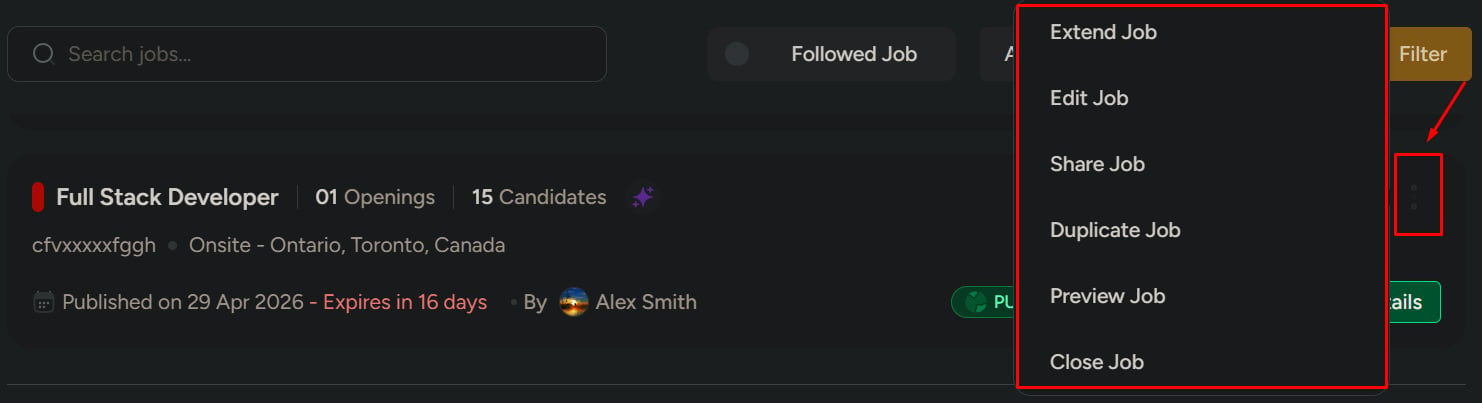
Click the **action menu** on that job row.
 ## Common actions
Update job details such as title, openings, description, pipeline, or members.
Publish, unpublish, or restrict who can see and apply to the job.
Share the job externally or preview how it appears to candidates.
Reuse a job structure or extend the expiry date when hiring is still active.
Stop accepting new candidates while keeping existing pipeline records visible.
Keep important jobs easy to find without changing the job itself.
## Change publish status
Use publish status to control who can see or apply to a job.
Makes the job visible to everyone, including external candidates.
Limits visibility for sensitive or executive roles.
Hides the job from external users. Only internal teams can see and apply.
Stops new applications while keeping existing candidates active in the pipeline.
Fully closes the job. No new applications are accepted.
## Common actions
Update job details such as title, openings, description, pipeline, or members.
Publish, unpublish, or restrict who can see and apply to the job.
Share the job externally or preview how it appears to candidates.
Reuse a job structure or extend the expiry date when hiring is still active.
Stop accepting new candidates while keeping existing pipeline records visible.
Keep important jobs easy to find without changing the job itself.
## Change publish status
Use publish status to control who can see or apply to a job.
Makes the job visible to everyone, including external candidates.
Limits visibility for sensitive or executive roles.
Hides the job from external users. Only internal teams can see and apply.
Stops new applications while keeping existing candidates active in the pipeline.
Fully closes the job. No new applications are accepted.
 ## Edit a job
Use this when job details are incorrect or need updates.
Open the job in edit mode.
Adjust fields such as title, openings, description, pipeline, or members.
Save the updates. Changes apply immediately, and candidates already in the pipeline are unaffected.
## Extend a job
Use this when a job is expiring but you still need candidates.
Open the extension flow from the action menu.
Choose the new expiry date and save the change.
## Share, duplicate, and preview
Click **Share Job** to send the job externally using a link, email, or social sharing option.
Click **Duplicate Job** to reuse a similar job structure.
This is useful for repeat hiring, such as opening another similar role in the same quarter.
Click **Preview Job** to see how the job appears to candidates before sharing or publishing.
## Close a job
Click **Close Job** to stop accepting candidates. Existing candidates remain visible in the pipeline.
Closing a job affects hiring visibility and may stop new applications. Confirm the job is ready to close before continuing.
## Edit a job
Use this when job details are incorrect or need updates.
Open the job in edit mode.
Adjust fields such as title, openings, description, pipeline, or members.
Save the updates. Changes apply immediately, and candidates already in the pipeline are unaffected.
## Extend a job
Use this when a job is expiring but you still need candidates.
Open the extension flow from the action menu.
Choose the new expiry date and save the change.
## Share, duplicate, and preview
Click **Share Job** to send the job externally using a link, email, or social sharing option.
Click **Duplicate Job** to reuse a similar job structure.
This is useful for repeat hiring, such as opening another similar role in the same quarter.
Click **Preview Job** to see how the job appears to candidates before sharing or publishing.
## Close a job
Click **Close Job** to stop accepting candidates. Existing candidates remain visible in the pipeline.
Closing a job affects hiring visibility and may stop new applications. Confirm the job is ready to close before continuing.
 ## Follow or pin a job
Follow and pin are quick-access shortcuts. They do not change the job itself.
* **Follow** — track updates to this job in your followed list
* **Pin** — keep this job at the top of the Jobs list
## Follow or pin a job
Follow and pin are quick-access shortcuts. They do not change the job itself.
* **Follow** — track updates to this job in your followed list
* **Pin** — keep this job at the top of the Jobs list
 ## Related
Find, filter, and switch views across your job list.
Open a job to track candidates and pipeline stages.
## Related
Find, filter, and switch views across your job list.
Open a job to track candidates and pipeline stages.