> ## Documentation Index
> Fetch the complete documentation index at: https://help.mercury360.com/llms.txt
> Use this file to discover all available pages before exploring further.
# Profile Overview
> View and understand your personal profile details used for identification and scheduling.
Your **Profile** contains your basic account information and preferences. This information is used across the system for identification and scheduling.
## What your profile includes
* Profile image
* Name
* Email
* Time zone
## When to use this
Use this when you need to:
* View your account details
* Confirm your contact information
* Check your time zone settings
Review your profile before making updates to ensure your current details are correct.
## Access your profile
In the top bar, click your name.
Select **Profile**.
 You’ll be redirected to your profile page.
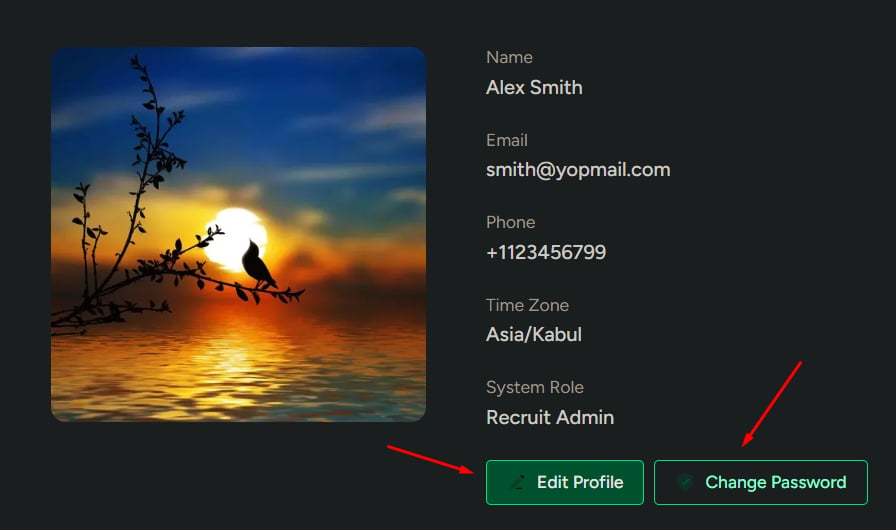
## Profile layout
The profile page is divided into two sections:
### Profile summary
Shows:
* Profile image
* Name
* Email
* Time zone
Use this for a quick view of your account information.
### Available actions
From this page, you can:
* Edit profile details
* Change your password
These actions are available as buttons on the page.
You’ll be redirected to your profile page.
## Profile layout
The profile page is divided into two sections:
### Profile summary
Shows:
* Profile image
* Name
* Email
* Time zone
Use this for a quick view of your account information.
### Available actions
From this page, you can:
* Edit profile details
* Change your password
These actions are available as buttons on the page.
 ## Why these matter
If your profile information is incorrect:
* Communication may be affected
* Scheduling may be inaccurate
* Account identification may be unclear
Keeping your profile updated helps ensure smooth system usage—especially for scheduling across time zones.
## Why these matter
If your profile information is incorrect:
* Communication may be affected
* Scheduling may be inaccurate
* Account identification may be unclear
Keeping your profile updated helps ensure smooth system usage—especially for scheduling across time zones.