> ## Documentation Index
> Fetch the complete documentation index at: https://help.mercury360.com/llms.txt
> Use this file to discover all available pages before exploring further.
# Candidate Reports
> Find drop-off points in the hiring funnel, evaluate sourcing quality, and track conversion from application to hire.
Candidate Reports answer the question: **Where is the hiring process breaking?** Use them to identify drop-off points, evaluate sourcing, and track conversion.
## When to use this report
Use Candidate Reports when you need to:
* Understand **candidate flow across stages**
* Identify **where candidates are dropping off**
* Measure conversion from **application to hire**
## Open Candidate Reports
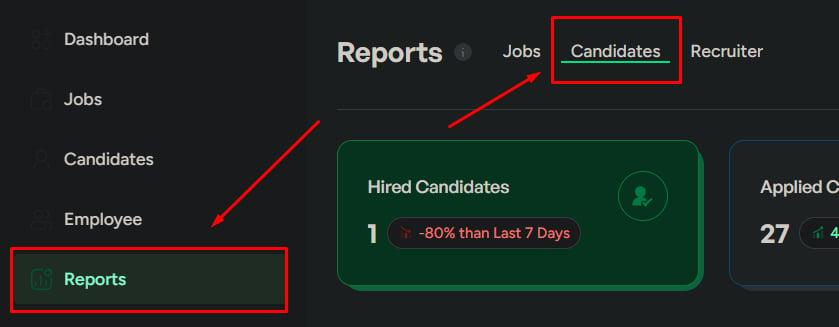
Click **Reports** in the left menu.
Click the **Candidates** tab.
 ## Report sections
Status distribution and funnel drop-off signals.
Common disqualify reasons that indicate screening or sourcing issues.
Which sources bring volume vs which sources bring qualified candidates.
Key rates that explain where the funnel leaks.
## Candidate status overview
Shows distribution across statuses:
* Hired
* Applied
* Interviewed
* Disqualified
When reviewing overall pipeline health.
* **High applied, low interviewed** — weak screening or overly strict filtering
* **High interviewed, low hired** — poor interview outcomes
## Candidate drop-off rate
The percentage of candidates leaving the process early.
When hiring slows down unexpectedly.
* **High drop-off early** — job mismatch or unclear expectations
* **High drop-off late** — interview experience or evaluation issues
Review the job description for clarity, check candidate experience across stages, and analyze rejection patterns.
## Disqualified candidates
Lists the most common reasons candidates are disqualified.
| Signal | Action |
| -------------------- | --------------------------------------------------------------------------------------------------------------------------------- |
| **Repeated reasons** | Indicates consistent screening or sourcing issues — refine job requirements, improve screening, and align on evaluation criteria. |
## Application sources
Shows where candidates are coming from (job portals, referrals, career page, etc.).
When candidate volume or quality isn't as expected.
Sources with high volume but **low quality** — inefficient sourcing channels.
Invest more in high-quality sources and reduce reliance on low performers.
## Conversion metrics
Three linked rates that help explain where the funnel is leaking.
% of candidates accepting offers. Low rate often signals compensation or role mismatch.
% of interviewed candidates who receive offers. Low rate can indicate poor candidate quality or strict evaluation.
% of offers that result in hires. Low rate indicates candidates are declining offers.
Read the three rates together. Low **offer acceptance** with a healthy **interview-to-offer** usually points to compensation or role fit—not screening.
## Experienced candidate analysis
Insights on senior-level candidates in the pipeline.
| Signal | Action |
| ----------------------------- | ---------------------------------------------------------------------------- |
| **Low senior candidate flow** | Sourcing issue — target senior hiring channels and refine role expectations. |
## Geographic distribution
Candidate locations across regions or cities.
When hiring requires location-specific candidates.
Low presence in your target location.
Adjust job location or add remote options, and improve location-based targeting.
## Date range
Control the time period:
* **Last 7 days** — recent activity
* **Last 30 days** — overall trend
* **Custom range** — detailed analysis
Always check the date range before drawing conclusions.
## Export reports
Export as **CSV**, **PDF**, or **XLSX**. Select a specific report or export all sections.
## Report sections
Status distribution and funnel drop-off signals.
Common disqualify reasons that indicate screening or sourcing issues.
Which sources bring volume vs which sources bring qualified candidates.
Key rates that explain where the funnel leaks.
## Candidate status overview
Shows distribution across statuses:
* Hired
* Applied
* Interviewed
* Disqualified
When reviewing overall pipeline health.
* **High applied, low interviewed** — weak screening or overly strict filtering
* **High interviewed, low hired** — poor interview outcomes
## Candidate drop-off rate
The percentage of candidates leaving the process early.
When hiring slows down unexpectedly.
* **High drop-off early** — job mismatch or unclear expectations
* **High drop-off late** — interview experience or evaluation issues
Review the job description for clarity, check candidate experience across stages, and analyze rejection patterns.
## Disqualified candidates
Lists the most common reasons candidates are disqualified.
| Signal | Action |
| -------------------- | --------------------------------------------------------------------------------------------------------------------------------- |
| **Repeated reasons** | Indicates consistent screening or sourcing issues — refine job requirements, improve screening, and align on evaluation criteria. |
## Application sources
Shows where candidates are coming from (job portals, referrals, career page, etc.).
When candidate volume or quality isn't as expected.
Sources with high volume but **low quality** — inefficient sourcing channels.
Invest more in high-quality sources and reduce reliance on low performers.
## Conversion metrics
Three linked rates that help explain where the funnel is leaking.
% of candidates accepting offers. Low rate often signals compensation or role mismatch.
% of interviewed candidates who receive offers. Low rate can indicate poor candidate quality or strict evaluation.
% of offers that result in hires. Low rate indicates candidates are declining offers.
Read the three rates together. Low **offer acceptance** with a healthy **interview-to-offer** usually points to compensation or role fit—not screening.
## Experienced candidate analysis
Insights on senior-level candidates in the pipeline.
| Signal | Action |
| ----------------------------- | ---------------------------------------------------------------------------- |
| **Low senior candidate flow** | Sourcing issue — target senior hiring channels and refine role expectations. |
## Geographic distribution
Candidate locations across regions or cities.
When hiring requires location-specific candidates.
Low presence in your target location.
Adjust job location or add remote options, and improve location-based targeting.
## Date range
Control the time period:
* **Last 7 days** — recent activity
* **Last 30 days** — overall trend
* **Custom range** — detailed analysis
Always check the date range before drawing conclusions.
## Export reports
Export as **CSV**, **PDF**, or **XLSX**. Select a specific report or export all sections.
 ## Related
Job performance and hiring distribution.
Recruiter contribution and efficiency.
## Related
Job performance and hiring distribution.
Recruiter contribution and efficiency.