> ## Documentation Index
> Fetch the complete documentation index at: https://help.mercury360.com/llms.txt
> Use this file to discover all available pages before exploring further.
# Recruiter Reports
> Compare recruiter performance, identify ownership bottlenecks, and understand who is driving successful hires.
Recruiter Reports show **how effectively hiring work is being done**, by whom, and where bottlenecks live.
Use Recruiter Reports to evaluate **process and support needs**, not to assign blame. Metrics should start conversations, not end them.
## When to use this report
Use Recruiter Reports when you need to:
* Compare **recruiter performance**
* Identify **delays in hiring ownership**
* Understand who is contributing to **successful hires**
* Spot **inefficiencies** in the hiring process
## Open Recruiter Reports
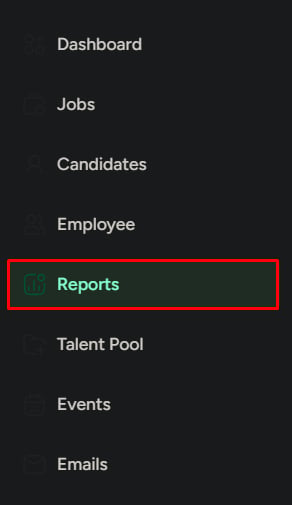
Click **Reports** in the left menu.
Click the **Recruiter** tab.
 ## Report sections
High-level productivity metrics like hires, workload, and time to hire.
Direct comparisons across recruiters to spot gaps and imbalances.
Resume volume over time to understand sourcing output.
Where candidates are dropped by stage, by recruiter or HR activity.
Offer requests, approvals, and declines to identify approval bottlenecks.
## Key performance overview
A quick read on recruiter productivity.
| Metric | What it tells you |
| ------------------------ | -------------------- |
| **Total hires** | Final outcomes |
| **Active jobs** | Current workload |
| **Average time to hire** | Speed of execution |
| **Success rate** | Hiring effectiveness |
When reviewing overall hiring productivity or comparing recruiters at a high level.
* **High active jobs, low hires** — workload imbalance or low effectiveness
* **High time to hire** — slow execution or process delays
Redistribute workload, check stage-wise delays, and review pipeline efficiency.
## Recruiter ranking
Direct performance comparison across the team:
* Total active jobs
* Total closed jobs
* Total hires
* Success rate
* Average time to hire
When evaluating performance across the team.
* **High activity, low hires** — inefficient pipeline handling
* **Low success rate** — weak candidate handling or poor closure
Review pipeline handling, identify bottlenecks in assigned jobs, and provide training or support.
## New resumes collected
Shows resumes collected over time, often broken down by source or collector. Use this to understand sourcing contribution.
| Signal | Action |
| ------------------------- | ------------------------------------------------------------------------------------------ |
| **Low resume collection** | Sourcing is underperforming — improve sourcing effort and assign clearer responsibilities. |
## Candidates dropped by stage
Shows where candidates are being removed in the pipeline, grouped by recruiter or HR activity.
When the pipeline is leaking candidates.
* **High drop at early stage** — weak screening or unclear job fit
* **High drop at interview stage** — evaluation inconsistency
Align screening criteria and standardize evaluation across recruiters.
## HR offer decisions
Tracks offer approvals and outcomes:
* Job offers requested
* Approved offers
* Declined offers
When offer approvals are slow or inconsistent.
* **High declined offers** — expectation gap or role mismatch
* **Low approvals** — approval bottleneck
Clarify approval rules and align HR with hiring teams on expectations.
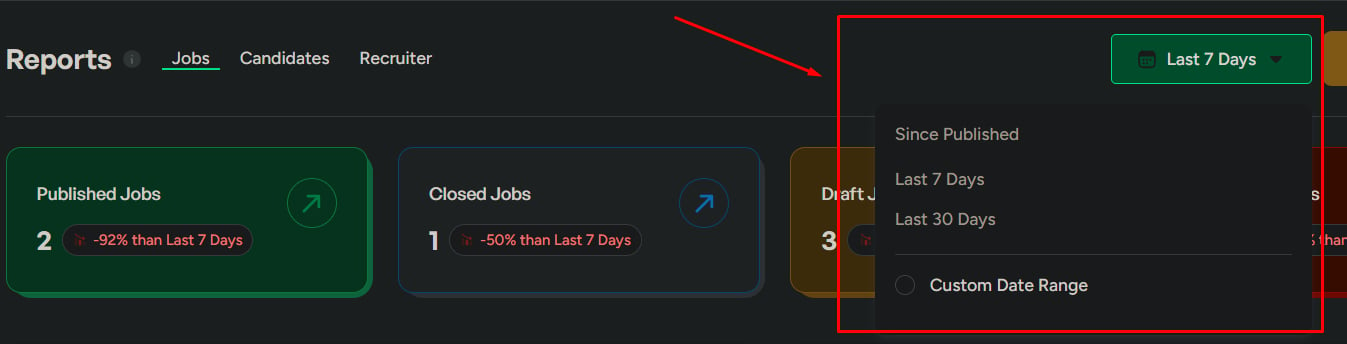
## Date range
Control the time period:
* **Last 7 days** — recent activity
* **Last 30 days** — overall performance
* **Custom range** — detailed analysis
Always check the date range before drawing conclusions.
## Report sections
High-level productivity metrics like hires, workload, and time to hire.
Direct comparisons across recruiters to spot gaps and imbalances.
Resume volume over time to understand sourcing output.
Where candidates are dropped by stage, by recruiter or HR activity.
Offer requests, approvals, and declines to identify approval bottlenecks.
## Key performance overview
A quick read on recruiter productivity.
| Metric | What it tells you |
| ------------------------ | -------------------- |
| **Total hires** | Final outcomes |
| **Active jobs** | Current workload |
| **Average time to hire** | Speed of execution |
| **Success rate** | Hiring effectiveness |
When reviewing overall hiring productivity or comparing recruiters at a high level.
* **High active jobs, low hires** — workload imbalance or low effectiveness
* **High time to hire** — slow execution or process delays
Redistribute workload, check stage-wise delays, and review pipeline efficiency.
## Recruiter ranking
Direct performance comparison across the team:
* Total active jobs
* Total closed jobs
* Total hires
* Success rate
* Average time to hire
When evaluating performance across the team.
* **High activity, low hires** — inefficient pipeline handling
* **Low success rate** — weak candidate handling or poor closure
Review pipeline handling, identify bottlenecks in assigned jobs, and provide training or support.
## New resumes collected
Shows resumes collected over time, often broken down by source or collector. Use this to understand sourcing contribution.
| Signal | Action |
| ------------------------- | ------------------------------------------------------------------------------------------ |
| **Low resume collection** | Sourcing is underperforming — improve sourcing effort and assign clearer responsibilities. |
## Candidates dropped by stage
Shows where candidates are being removed in the pipeline, grouped by recruiter or HR activity.
When the pipeline is leaking candidates.
* **High drop at early stage** — weak screening or unclear job fit
* **High drop at interview stage** — evaluation inconsistency
Align screening criteria and standardize evaluation across recruiters.
## HR offer decisions
Tracks offer approvals and outcomes:
* Job offers requested
* Approved offers
* Declined offers
When offer approvals are slow or inconsistent.
* **High declined offers** — expectation gap or role mismatch
* **Low approvals** — approval bottleneck
Clarify approval rules and align HR with hiring teams on expectations.
## Date range
Control the time period:
* **Last 7 days** — recent activity
* **Last 30 days** — overall performance
* **Custom range** — detailed analysis
Always check the date range before drawing conclusions.
 ## Export reports
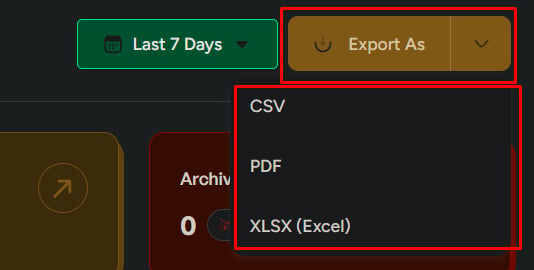
Export as **CSV**, **PDF**, or **XLSX**. Choose a single report or export all sections—only what you need.
## Export reports
Export as **CSV**, **PDF**, or **XLSX**. Choose a single report or export all sections—only what you need.
 ## Related
Job performance and hiring distribution.
Candidate behavior and drop-off analysis.
## Related
Job performance and hiring distribution.
Candidate behavior and drop-off analysis.