> ## Documentation Index
> Fetch the complete documentation index at: https://help.mercury360.com/llms.txt
> Use this file to discover all available pages before exploring further.
# Talent Pool
> Group and reuse candidates for future hiring so you don’t have to source from scratch.
Use **Talent Pool** to save candidates you may want to reach out to again later—organized by role, department, or skill. This helps you build a reusable pipeline and reduce future sourcing effort.
Talent Pools are for **storage and reuse**. They are not an active hiring workflow.
## Open Talent Pool
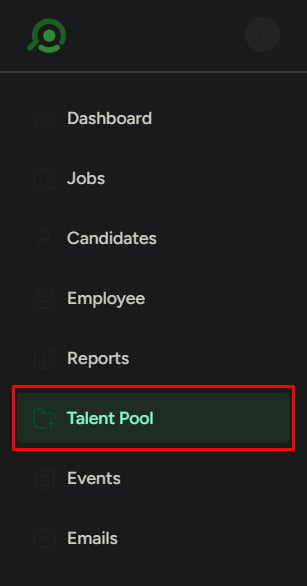
In the left menu, click **Talent Pool**.
You’ll see a list of all created talent pools.
 ## Talent pool list
Each talent pool shows:
* **Name**
* **Department**
* **Created date**
* **Number of candidates**
* **Follow** button
* **Options** (Duplicate, Archive, Edit, Delete)
Use this view to quickly identify and manage your pools.
## Search and filter talent pools
Use this when your list becomes large.
* Search by **name** using the search bar
* Filter by:
* **Department**
* **Date created**
* **Active / Archived / Followed**
Use filters to quickly find the right pool when you have multiple pools for similar roles or teams.
## Talent pool list
Each talent pool shows:
* **Name**
* **Department**
* **Created date**
* **Number of candidates**
* **Follow** button
* **Options** (Duplicate, Archive, Edit, Delete)
Use this view to quickly identify and manage your pools.
## Search and filter talent pools
Use this when your list becomes large.
* Search by **name** using the search bar
* Filter by:
* **Department**
* **Date created**
* **Active / Archived / Followed**
Use filters to quickly find the right pool when you have multiple pools for similar roles or teams.
 ## Create a talent pool
Use this when you want to organize candidates for future use.
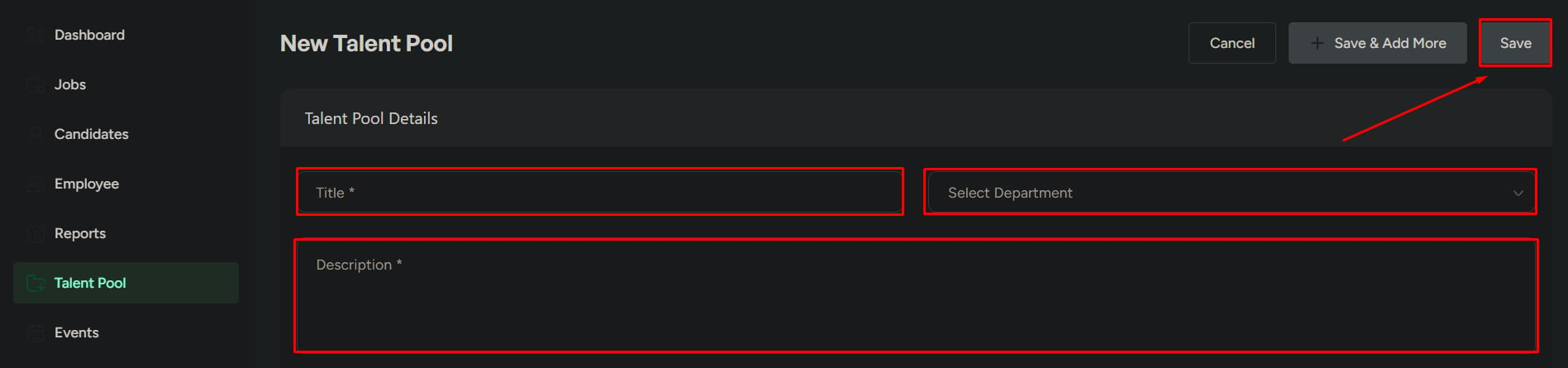
Click **Create New Talent Pool**.
Enter:
* **Title** (required)
* **Department**
* **Description**
Click **Save**.
Create pools with a clear purpose (role, skill set, or hiring need). This makes them easier to reuse later.
Avoid creating duplicate or unclear pools—this makes it harder to find and maintain the right candidate groups over time.
## Create a talent pool
Use this when you want to organize candidates for future use.
Click **Create New Talent Pool**.
Enter:
* **Title** (required)
* **Department**
* **Description**
Click **Save**.
Create pools with a clear purpose (role, skill set, or hiring need). This makes them easier to reuse later.
Avoid creating duplicate or unclear pools—this makes it harder to find and maintain the right candidate groups over time.

 ## Open a talent pool
Click any talent pool to view the candidates saved inside it.
## Candidate list inside a pool
Each candidate shows:
* **Name**
* **Department**
* **Reason for adding**
* **Evaluation score**
* **Source stage** (the stage the candidate was added from)
* **Date added**
Use this to understand why the candidate was saved and how strong the candidate is.
## Search and filter candidates
Use this when managing large pools.
* Search by **candidate name**
* Filter by:
* **Department**
* **Score range** (min–max)
Use this to quickly shortlist candidates.
## Open a talent pool
Click any talent pool to view the candidates saved inside it.
## Candidate list inside a pool
Each candidate shows:
* **Name**
* **Department**
* **Reason for adding**
* **Evaluation score**
* **Source stage** (the stage the candidate was added from)
* **Date added**
Use this to understand why the candidate was saved and how strong the candidate is.
## Search and filter candidates
Use this when managing large pools.
* Search by **candidate name**
* Filter by:
* **Department**
* **Score range** (min–max)
Use this to quickly shortlist candidates.
 ## Add candidates to a talent pool
Use this when you want to reuse candidates for future hiring.
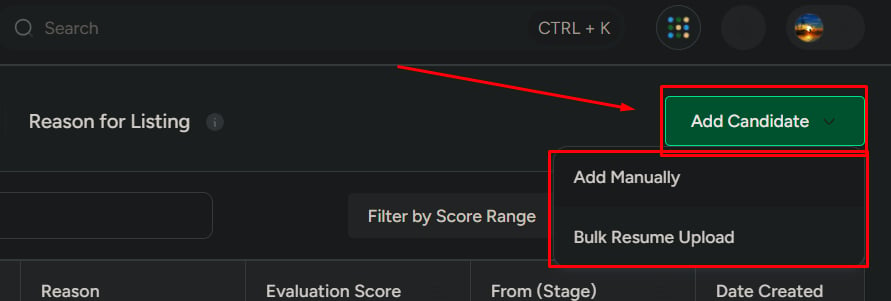
### Options
* **Add manually**
* **Bulk resume upload**
## Add candidates to a talent pool
Use this when you want to reuse candidates for future hiring.
### Options
* **Add manually**
* **Bulk resume upload**
 ### When to use which
* **Manual**: when adding selected or known candidates
* **Bulk**: when adding many candidates at once
## What Talent Pool is not for
Do not use Talent Pools for:
* Active hiring pipelines
* Candidate evaluation or stage movement
* Immediate hiring decisions
Talent Pool is a **storage and reuse system**, not a hiring workflow.
### When to use which
* **Manual**: when adding selected or known candidates
* **Bulk**: when adding many candidates at once
## What Talent Pool is not for
Do not use Talent Pools for:
* Active hiring pipelines
* Candidate evaluation or stage movement
* Immediate hiring decisions
Talent Pool is a **storage and reuse system**, not a hiring workflow.