
.png?fit=max&auto=format&n=wMd7bxoi6I_Hm3IN&q=85&s=fe686234f9638b0fbfbc991ca32f7bc3)
Onboarding is only for employees in the joining phase. Once onboarding is complete, the employee moves to the People Directory and is managed there.
When to use this page
Use this page when you need to:- Track onboarding progress for new employees
- Identify employees who are not fully active yet
- Monitor onboarding workload across departments
- Spot delayed onboarding records
Open Onboarding
1
Go to Employees
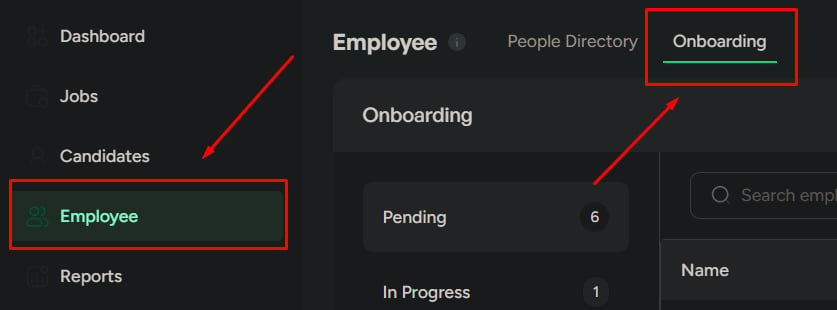
Open Employees from the left navigation.
2
Open the Onboarding tab
Click the Onboarding tab to view employees grouped by onboarding stage.
When onboarding starts
Onboarding begins when:- A new employee is added to the system
- Onboarding is assigned as part of the employee setup
Onboarding doesn’t start from this page. It starts when an employee record is created. This page is for tracking onboarding already in motion.
Onboarding stages
Pending
Pending
Onboarding has not started yet. The employee is waiting for setup.Use this to identify upcoming joins.
Scheduled
Scheduled
Onboarding is planned but has not started. Tasks or a start date may already be set.Use this to prepare in advance.
In progress
In progress
Tasks are currently being completed. The employee is actively being set up.Use this to track ongoing work.
Completed
Completed
Onboarding is fully done. The employee is ready for normal work.This is the final state before the employee moves into regular employee management.
Search onboarding employees
Use search when you need to find someone quickly.1
Search by employee name
Type the employee’s name in the search bar. Results update instantly.

Filter onboarding employees
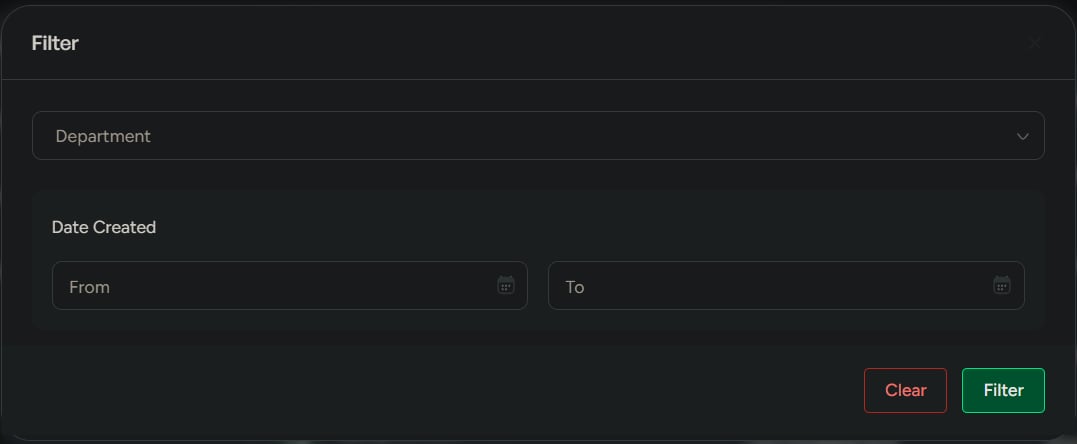
Click Filter to focus your tracking.
Use filters to track onboarding workload over time or by team.

What you can do here
Track progress
Review onboarding status by stage.
Spot delays
Identify employees stuck in early or incomplete stages.
Monitor workload
Track onboarding volume across departments and time periods.
Prepare teams
Use scheduled onboarding records to prepare before start dates.
Related
Add an employee
Create the employee record that starts onboarding.
Manage employees
Manage employees after onboarding is complete.