
.png?fit=max&auto=format&n=wMd7bxoi6I_Hm3IN&q=85&s=fe686234f9638b0fbfbc991ca32f7bc3)
When to use this report
Use Candidate Reports when you need to:- Understand candidate flow across stages
- Identify where candidates are dropping off
- Measure conversion from application to hire
Open Candidate Reports
1
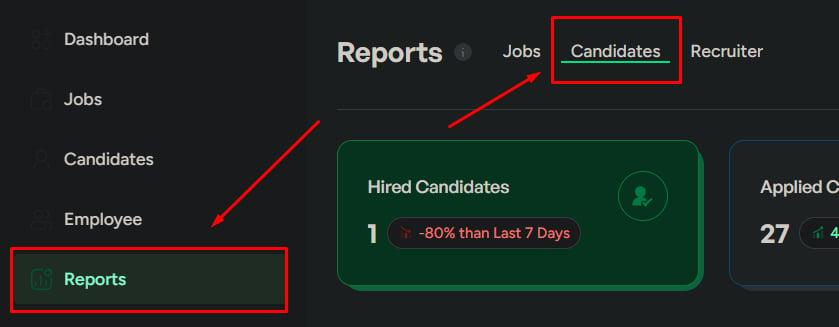
Go to Reports
Click Reports in the left menu.
2
Open the Candidates tab
Click the Candidates tab.
Report sections
Pipeline health
Status distribution and funnel drop-off signals.
Disqualification trends
Common disqualify reasons that indicate screening or sourcing issues.
Sourcing quality
Which sources bring volume vs which sources bring qualified candidates.
Conversion metrics
Key rates that explain where the funnel leaks.
Candidate status overview
Shows distribution across statuses:- Hired
- Applied
- Interviewed
- Disqualified
- When to look
- What to watch
When reviewing overall pipeline health.
Candidate drop-off rate
The percentage of candidates leaving the process early.When to look
When to look
When hiring slows down unexpectedly.
What to watch
What to watch
- High drop-off early — job mismatch or unclear expectations
- High drop-off late — interview experience or evaluation issues
What to do next
What to do next
Review the job description for clarity, check candidate experience across stages, and analyze rejection patterns.
Disqualified candidates
Lists the most common reasons candidates are disqualified.Application sources
Shows where candidates are coming from (job portals, referrals, career page, etc.).- When to look
- What to watch
- What to do next
When candidate volume or quality isn’t as expected.
Conversion metrics
Three linked rates that help explain where the funnel is leaking.Offer acceptance rate
% of candidates accepting offers. Low rate often signals compensation or role mismatch.
Interview-to-offer rate
% of interviewed candidates who receive offers. Low rate can indicate poor candidate quality or strict evaluation.
Offer-to-hire rate
% of offers that result in hires. Low rate indicates candidates are declining offers.
Experienced candidate analysis
Insights on senior-level candidates in the pipeline.Geographic distribution
Candidate locations across regions or cities.When to look
When to look
When hiring requires location-specific candidates.
What to watch
What to watch
Low presence in your target location.
What to do next
What to do next
Adjust job location or add remote options, and improve location-based targeting.
Date range
Control the time period:- Last 7 days — recent activity
- Last 30 days — overall trend
- Custom range — detailed analysis
Always check the date range before drawing conclusions.
Export reports
Export as CSV, PDF, or XLSX. Select a specific report or export all sections.
Related
Jobs Reports
Job performance and hiring distribution.
Recruiter Reports
Recruiter contribution and efficiency.