
.png?fit=max&auto=format&n=wMd7bxoi6I_Hm3IN&q=85&s=fe686234f9638b0fbfbc991ca32f7bc3)
When to use job actions
Use job actions when you need to:- Update job details
- Control job visibility and status
- Share or preview a job
- Duplicate a similar role
- Manage jobs without leaving the Jobs list
Open the action menu
1
Find the job
Locate the job in the Jobs list.
2
Open the action menu
Click the action menu on that job row.

Common actions
Edit job
Update job details such as title, openings, description, pipeline, or members.
Change visibility
Publish, unpublish, or restrict who can see and apply to the job.
Share or preview
Share the job externally or preview how it appears to candidates.
Duplicate or extend
Reuse a job structure or extend the expiry date when hiring is still active.
Close job
Stop accepting new candidates while keeping existing pipeline records visible.
Follow or pin
Keep important jobs easy to find without changing the job itself.
Change publish status
Use publish status to control who can see or apply to a job.Publish globally
Publish globally
Makes the job visible to everyone, including external candidates.
Use confidentially
Use confidentially
Limits visibility for sensitive or executive roles.
Unpublish and use internally
Unpublish and use internally
Hides the job from external users. Only internal teams can see and apply.
Close for new candidates
Close for new candidates
Stops new applications while keeping existing candidates active in the pipeline.
Close job
Close job
Fully closes the job. No new applications are accepted.

Edit a job
Use this when job details are incorrect or need updates.1
Click Edit Job
Open the job in edit mode.
2
Update the details
Adjust fields such as title, openings, description, pipeline, or members.
3
Save changes
Save the updates. Changes apply immediately, and candidates already in the pipeline are unaffected.
Extend a job
Use this when a job is expiring but you still need candidates.1
Click Extend Job
Open the extension flow from the action menu.
2
Update the expiry date
Choose the new expiry date and save the change.
Share, duplicate, and preview
- Duplicate job
- Preview job
Close a job
Click Close Job to stop accepting candidates. Existing candidates remain visible in the pipeline.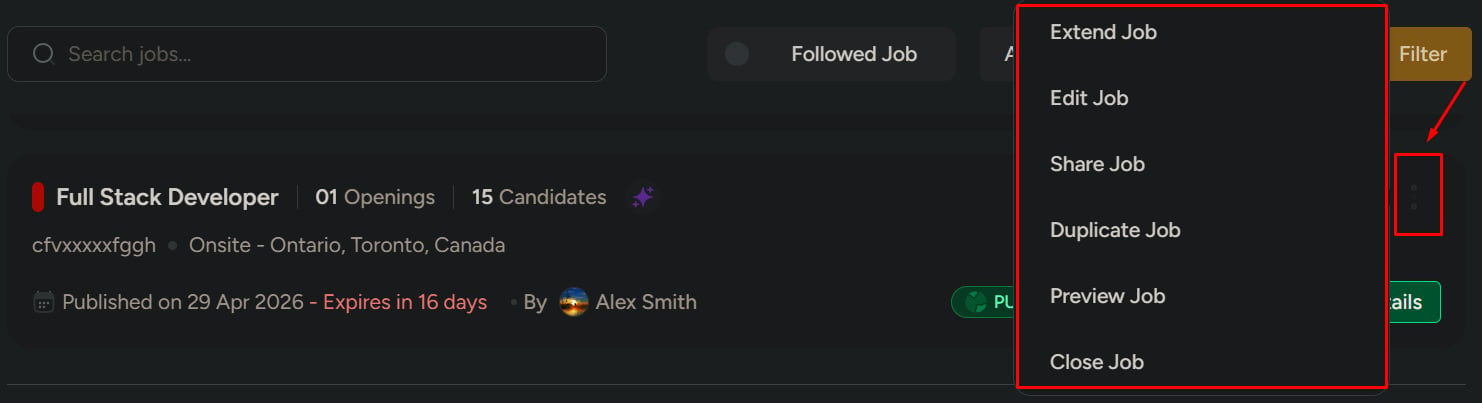
Follow or pin a job
Follow and pin are quick-access shortcuts. They do not change the job itself.- Follow — track updates to this job in your followed list
- Pin — keep this job at the top of the Jobs list

Related
Manage jobs
Find, filter, and switch views across your job list.
View job details & pipeline
Open a job to track candidates and pipeline stages.