
.png?fit=max&auto=format&n=wMd7bxoi6I_Hm3IN&q=85&s=fe686234f9638b0fbfbc991ca32f7bc3)
When to use this
Use this when you need to:- Review full event details
- Update event information
- Cancel an event
- Confirm interview or call details before joining
Open event details
1
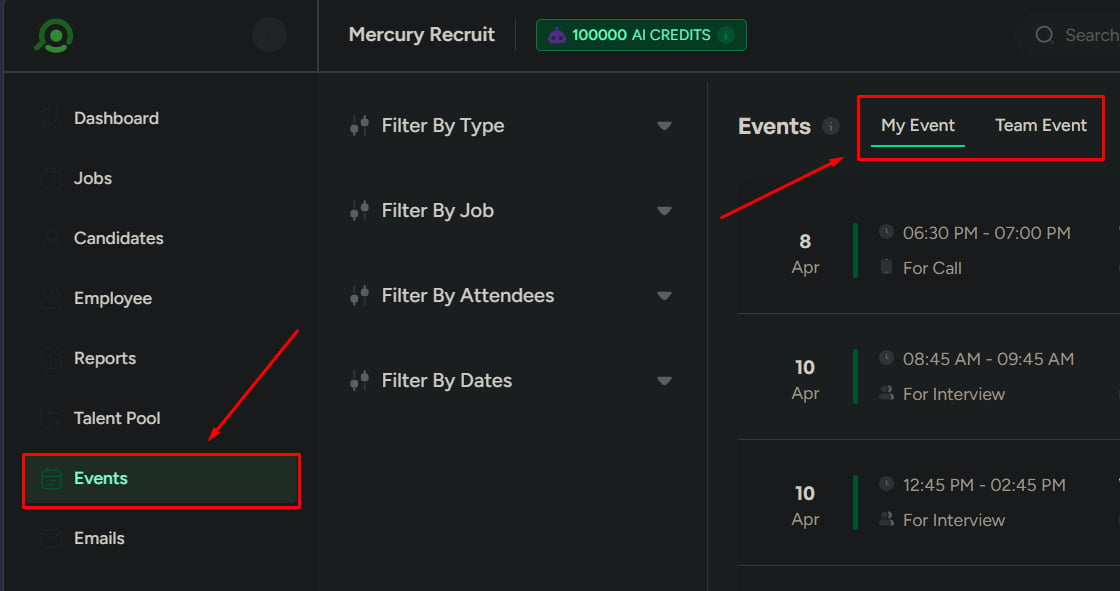
Go to Events → My Events or Team Events.
2
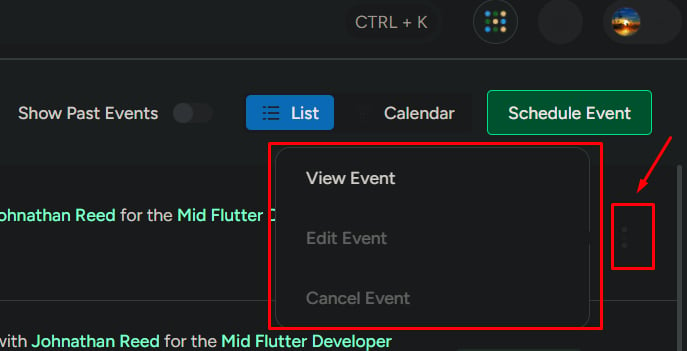
On any event, click View Event.
What you’ll see in event details
Each event includes:- Event type (Call or Interview)
- Start date and end date
- Start time and end time
- Organizer
- Attendees
- Location or meeting link
- Notes or message
- Job and candidate information
Event actions
Available actions depend on who created the event.View event
Use View to:- Check event information
- Confirm the schedule
- Verify attendees
Viewing is read-only—no changes are made.
Edit event
Use Edit when event details need to be updated. You can update:- Date and time
- Attendees
- Location or meeting link
- Event details
- Attachments
Cancel event
Use Cancel when the event should not happen. Important rules:- Only the event creator can cancel the event
- Cancellation affects all attendees immediately
- The event is removed from the active list
- Attendees are notified (if notifications are enabled)
What to be careful about
- Editing without being the creator will fail
- Late cancellations can disrupt interviews
- Incorrect updates can create scheduling confusion for candidates