
.png?fit=max&auto=format&n=wMd7bxoi6I_Hm3IN&q=85&s=fe686234f9638b0fbfbc991ca32f7bc3)
Use Recruiter Reports to evaluate process and support needs, not to assign blame. Metrics should start conversations, not end them.
When to use this report
Use Recruiter Reports when you need to:- Compare recruiter performance
- Identify delays in hiring ownership
- Understand who is contributing to successful hires
- Spot inefficiencies in the hiring process
Open Recruiter Reports
1
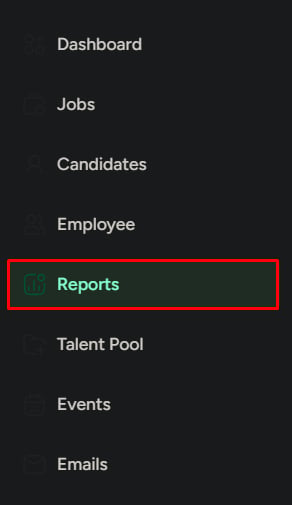
Go to Reports
Click Reports in the left menu.
2
Open the Recruiter tab
Click the Recruiter tab.
Report sections
Key performance overview
High-level productivity metrics like hires, workload, and time to hire.
Recruiter ranking
Direct comparisons across recruiters to spot gaps and imbalances.
Sourcing contribution
Resume volume over time to understand sourcing output.
Pipeline drop-offs
Where candidates are dropped by stage, by recruiter or HR activity.
Offer decisions
Offer requests, approvals, and declines to identify approval bottlenecks.
Key performance overview
A quick read on recruiter productivity.- When to look
- What to watch
- What to do next
When reviewing overall hiring productivity or comparing recruiters at a high level.
Recruiter ranking
Direct performance comparison across the team:- Total active jobs
- Total closed jobs
- Total hires
- Success rate
- Average time to hire
When to look
When to look
When evaluating performance across the team.
What to watch
What to watch
- High activity, low hires — inefficient pipeline handling
- Low success rate — weak candidate handling or poor closure
What to do next
What to do next
Review pipeline handling, identify bottlenecks in assigned jobs, and provide training or support.
New resumes collected
Shows resumes collected over time, often broken down by source or collector. Use this to understand sourcing contribution.Candidates dropped by stage
Shows where candidates are being removed in the pipeline, grouped by recruiter or HR activity.- When to look
- What to watch
- What to do next
When the pipeline is leaking candidates.
HR offer decisions
Tracks offer approvals and outcomes:- Job offers requested
- Approved offers
- Declined offers
When to look
When to look
When offer approvals are slow or inconsistent.
What to watch
What to watch
- High declined offers — expectation gap or role mismatch
- Low approvals — approval bottleneck
What to do next
What to do next
Clarify approval rules and align HR with hiring teams on expectations.
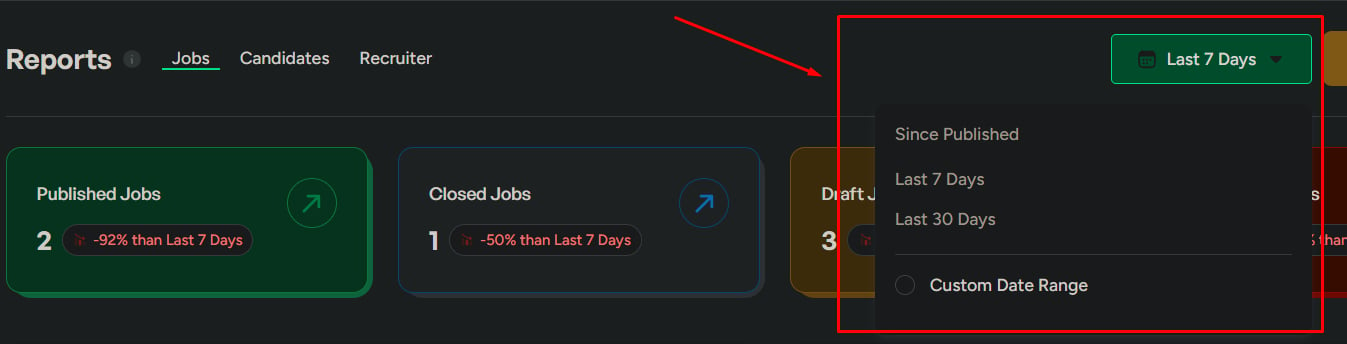
Date range
Control the time period:- Last 7 days — recent activity
- Last 30 days — overall performance
- Custom range — detailed analysis
Always check the date range before drawing conclusions.
Export reports
Export as CSV, PDF, or XLSX. Choose a single report or export all sections—only what you need.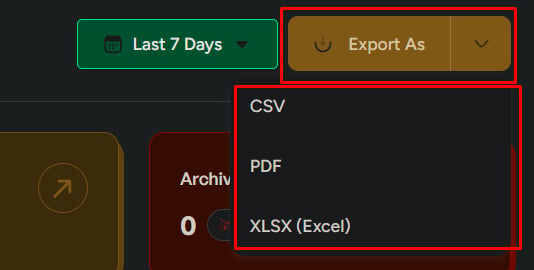
Related
Jobs Reports
Job performance and hiring distribution.
Candidate Reports
Candidate behavior and drop-off analysis.