
.png?fit=max&auto=format&n=wMd7bxoi6I_Hm3IN&q=85&s=fe686234f9638b0fbfbc991ca32f7bc3)
When to use this report
Use Job Reports when you need to:- Check whether jobs are being filled on time
- Identify jobs that are delayed or stuck
- Compare hiring performance across departments
Open Job Reports
1
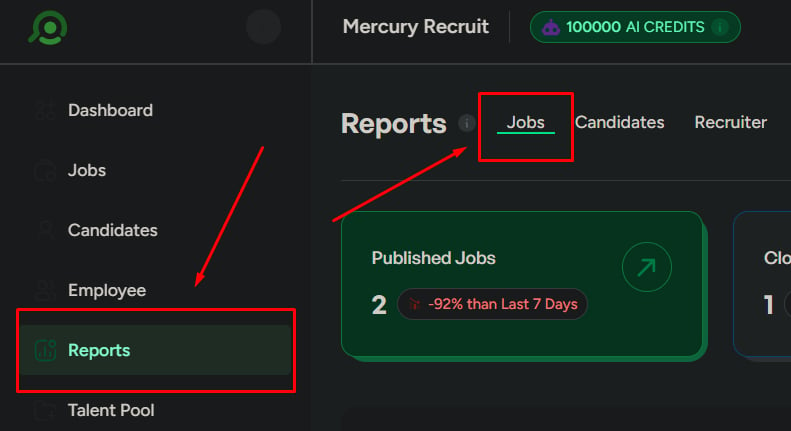
Go to Reports
Click Reports in the left menu.
2
Open the Jobs tab
Stay on the default Jobs tab.
Report sections
Progress & status
Understand job status distribution and overall workload.
Candidate flow
Track new candidates and where volume is coming from.
Quality & scoring
Review top candidates and score changes across stages.
Outcomes
Monitor completion rate and department-level performance.
Job status overview
Shows the distribution of jobs across statuses:- Published
- Closed
- Draft
- Archived
- When to look
- What to watch
- Tracking how many jobs are active vs closed
- Reviewing overall hiring workload
Newly added candidates
Shows recently added or applied candidates so you can track incoming flow.When to look
When to look
When checking if jobs are attracting candidates.
What to watch
What to watch
Low new candidates — indicates poor job visibility or a sourcing issue.
What to do next
What to do next
Review job visibility, check sourcing channels, and refine the job description.
Candidates by department
Shows candidate volume grouped by department—useful for hiring planning.Top candidates by job
Shows the top 10 ranked candidates for a selected job. Use it when shortlisting.Average score by stage (per job)
Shows average candidate scores at each hiring stage. Use it to evaluate screening quality.- When to look
- What to watch
- What to do next
When candidates are not progressing.
Hiring completion rate
The percentage of job openings successfully filled—your headline measure of hiring success.Jobs by department
Shows the number of openings per department—your hiring distribution at a glance.Open vs closed jobs by department
Compares open and closed jobs by team. Use this to spot delays.What to watch
What to watch
Many open but few closed — hiring is delayed in that department.
What to do next
What to do next
Identify bottlenecks in hiring stages and reallocate resources to delayed teams.
Date range
Control the time period for every chart on this page:- Last 7 days — recent activity
- Last 30 days — overall trend
- Custom range — detailed analysis
Always check the date range before drawing conclusions.

Export reports
Export as CSV, PDF, or XLSX. Select a specific report or export all sections—keep exports focused.
Related
Candidate Reports
Find where candidates drop off in the pipeline.
Recruiter Reports
Compare recruiter contribution and efficiency.